
🏏ICC Men's T20 W C 2026: Group A, M 27: India vs Pak at Colombo🏏

MAIRAS TRAUMA 15.2
Yrkkh is DEAD
🏏ICC Men's T20 World Cup 2026: M24: SA vs NZ at Ahmedabad🏏
Abhira ki Brain Surgery
The Great Gen3 Rant
DKP Tone it Down!
🏏ICC Men's T20 World Cup 2026: M23: ENG vs Scotland at Kolkata🏏
Do Makers Hate Abhira?
🏏ICC Men's T20 World Cup 2026: M25: WI vs NEP at Mumbai🏏
🏏ICC Men's T20 World Cup 2026: M 26: USA vs NAM at Chennai🏏
🏏India Women tour of Australia 2026: 1st T20I in Sydney🏏
🏏ICC Men's T20 World Cup 2026: M22: IRE vs Oman at Colombo🏏

Kareena is so natural and real
Ekta Kapoor s - Heer Ranjha - presented by Imtiaz Ali
Ranbir Kapoor new interview arks live instagram
Can u please guide me how to insert an image in the post ??
When I click on above attachment icon... it asks for url.. what is it ?
Sorry.. I am old in the forum but never done this 🤪
Admins... please move the post to the appropriate forum if needed
Hi
So if you are trying to post the image directly from google then right click on the said image, click "Copy image address". Click the picture icon and paste the copied URL in the said section. Hit enter and wait for the picture to get uploaded so that it can be previewed. Once loaded hit the post reply button.
If not from google, upload your image here (I prefer this). Once uploaded successfully, scroll down to get the hotlinks for forum. From there copy the URL starting from https://...
Repeat the process as above
Hope it helps. If not please reply back I will try to paste some pictures for better understanding 👍🏼
—-Originally posted by: Mysterie_girl
Hi
So if you are trying to post the image directly from google then right click on the said image, click "Copy image address". Click the picture icon and paste the copied URL in the said section. Hit enter and wait for the picture to get uploaded so that it can be previewed. Once loaded hit the post reply button.
If not from google, upload your image here (I prefer this). Once uploaded successfully, scroll down to get the hotlinks for forum. From there copy the URL starting from https://...
Repeat the process as above
Hope it helps. If not please reply back I will try to paste some pictures for better understanding 👍🏼
[url=https://postimg.cc/FYx4p2Mr][img]https://i.postimg.cc/L8c89Sv1/A7-A7-C318-346-D-49-D2-A1-DE-4-B9-EDEF4-E42-A.png[/img][/url]Originally posted by: Mysterie_girl
Hi
So if you are trying to post the image directly from google then right click on the said image, click "Copy image address". Click the picture icon and paste the copied URL in the said section. Hit enter and wait for the picture to get uploaded so that it can be previewed. Once loaded hit the post reply button.
If not from google, upload your image here (I prefer this). Once uploaded successfully, scroll down to get the hotlinks for forum. From there copy the URL starting from https://...
Repeat the process as above
Hope it helps. If not please reply back I will try to paste some pictures for better understanding 👍🏼
I also want to learn…inwant to paste only picture here not wo red wala neeche ka..
Step:1
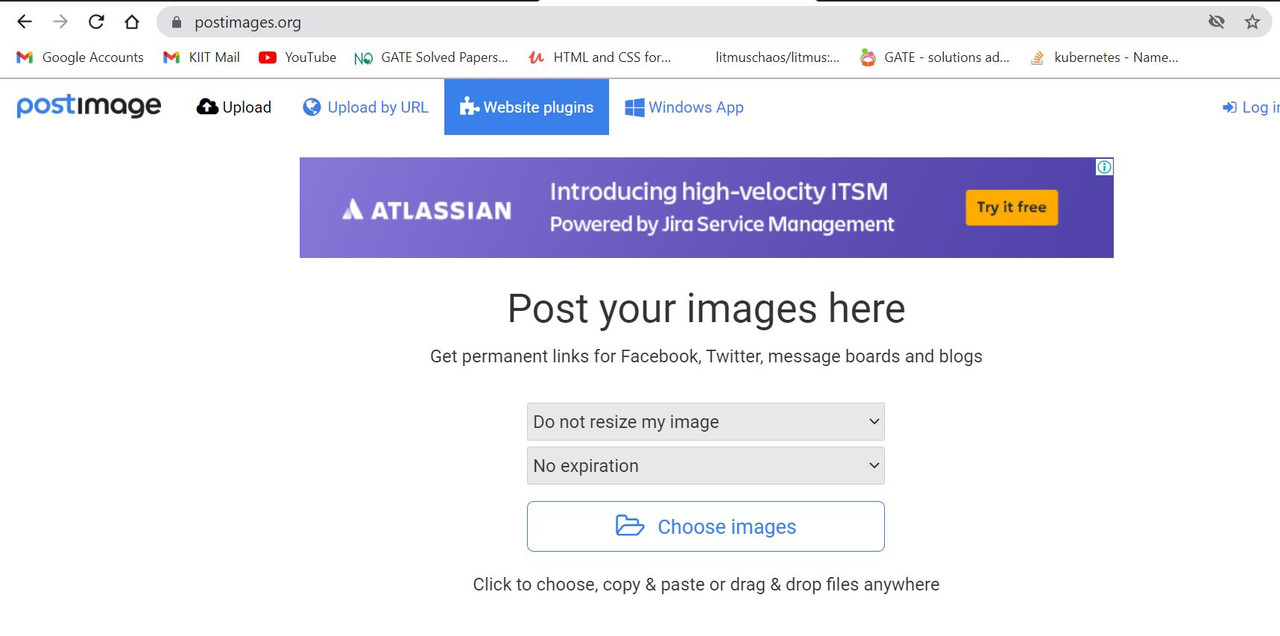
Step:2
Copy the marked URL only.
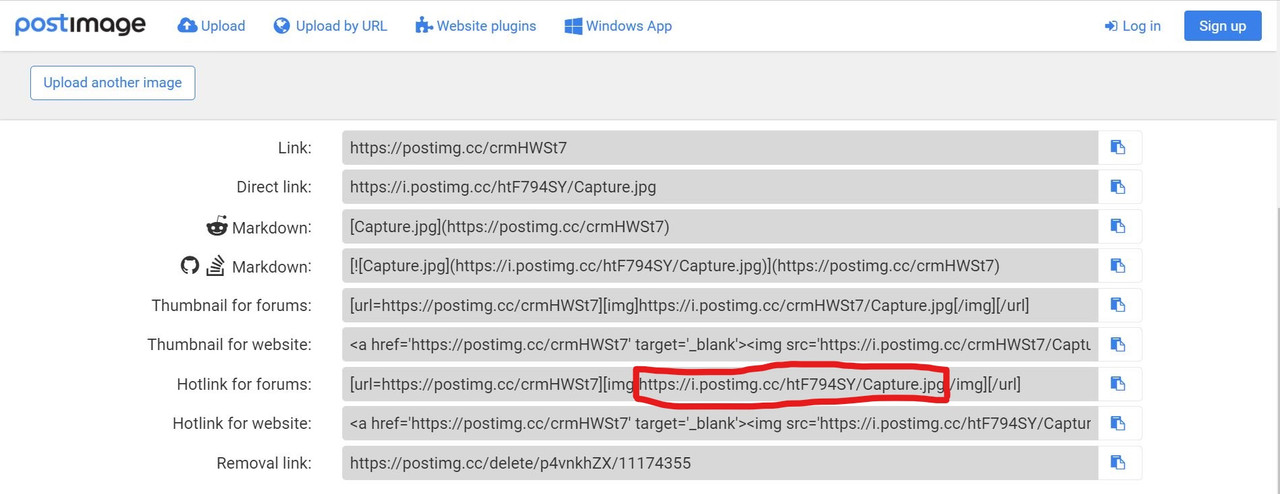
Step:3
Click on the picture icon and paste the link (copied from above step) in the URL section and hit enter. You will be able to see the preview. Once previewed, adjust the size (if required) and click post reply.
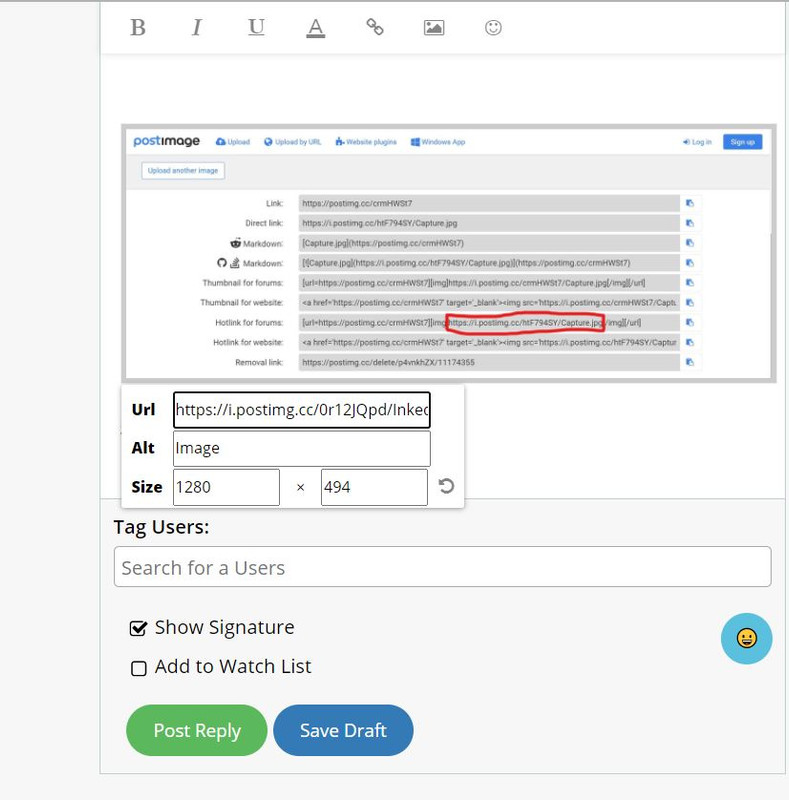
Please let me know if this is clear or not.
Originally posted by: Mysterie_girl
Step:1
Step:2
Copy the marked URL only.
Step:3
Click on the picture icon and paste the link (copied from above step) in the URL section and hit enter. You will be able to see the preview. Once previewed, adjust the size (if required) and click post reply.
Please let me know if this is clear or not.
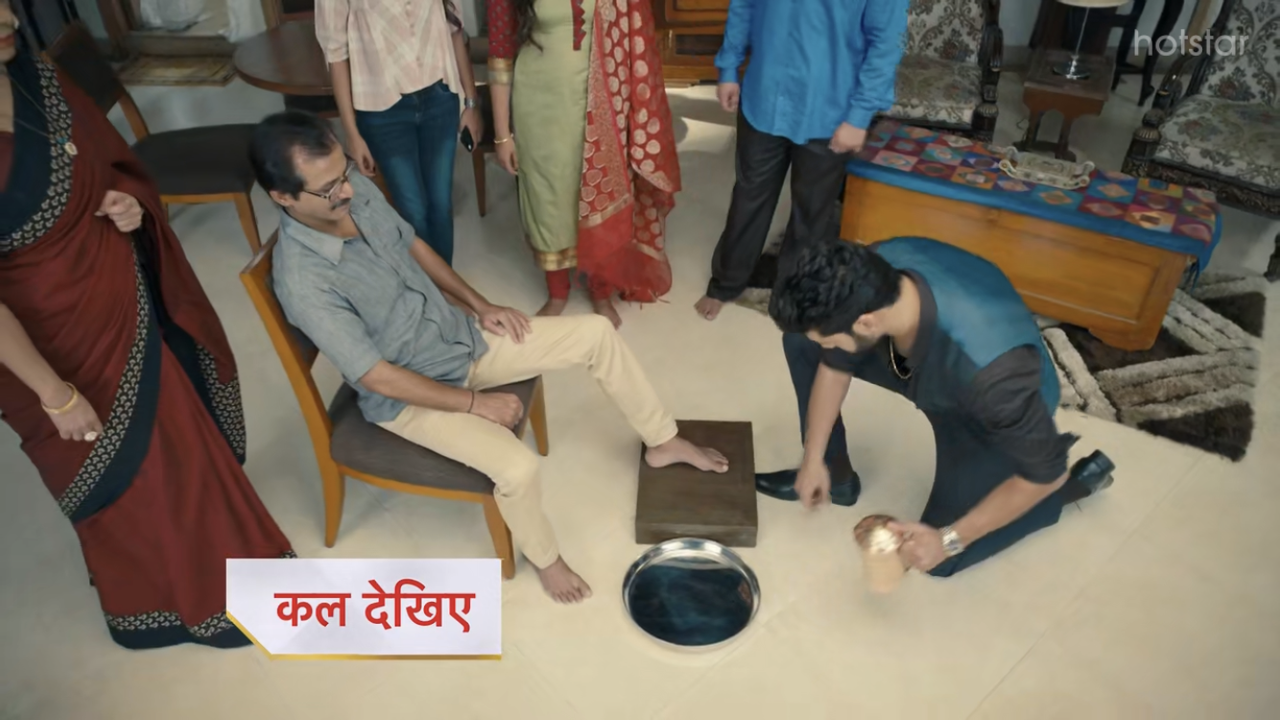



















 Anupamaa

